


To understand the text below, knowledge of HTTP protocol basics is required, particularly HTTP methods and response codes. If you need a refresher on these topics, we encourage you to check out our introduction to HTTP.
First off, what is an API?
API, which stands for Application Programming Interface, is a set of rules and tools that allow different software programs to communicate with each other. An API provides clearly defined functions (or methods) that can be called to retrieve data or perform specific operations, enabling interaction between different applications.
The way an API works is often compared to a waiter in a restaurant, who relays orders between the customer and the kitchen. Imagine the following situation: you enter a restaurant, order food, the waiter takes the order, passes it to the kitchen, the kitchen prepares the food, and the waiter picks it up and brings it to you. This process can be illustrated as in the graphic below:
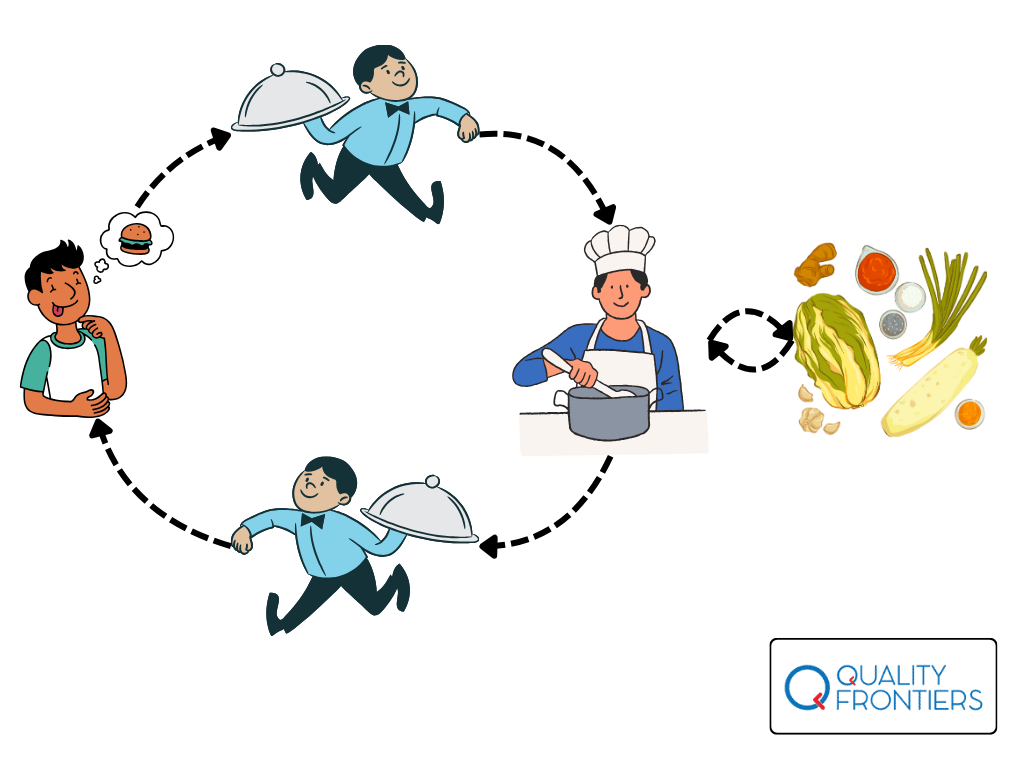
What does this have to do with APIs? Imagine the API as the menu in a restaurant. The menu lists various dishes (functions) you can order, along with a description of what you’ll get. When you choose a dish (send a request), the kitchen (server) prepares it and serves it to you (the response), using the available ingredients (database). When you order dish X, you don’t need to know the exact recipe; you just state which dish you want and aren’t concerned with precisely how it’s prepared. You only care about the outcome – receiving that specific dish.
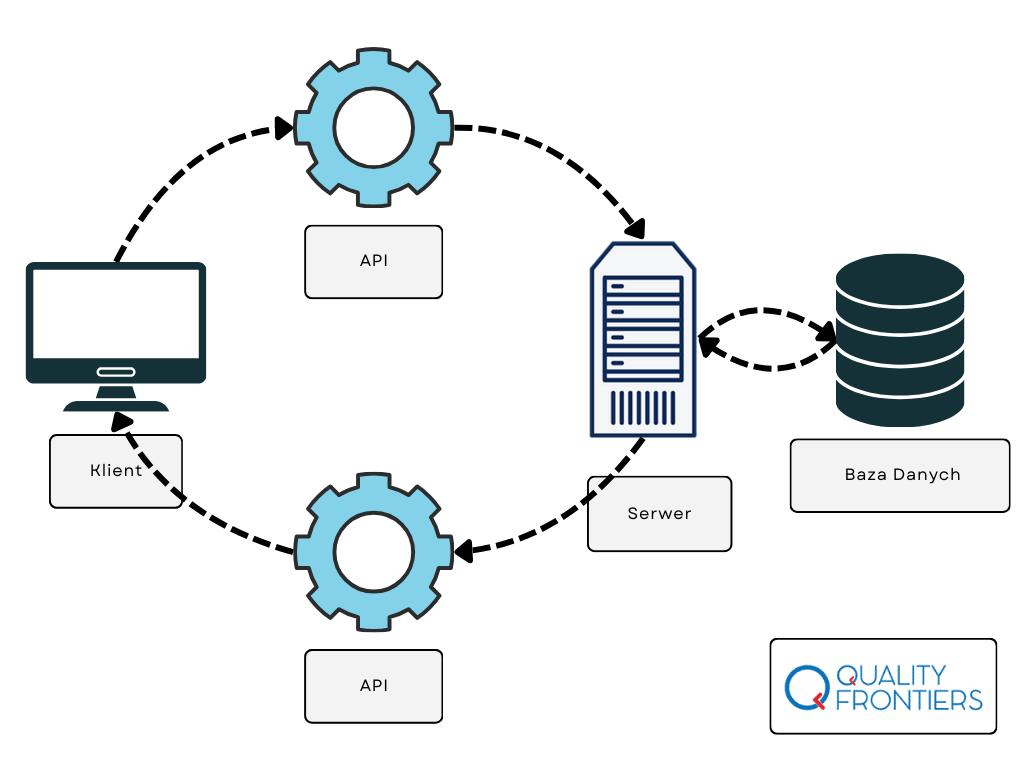
This is exactly how an API works – it allows applications to communicate with each other by exchanging requests and responses. The API user doesn’t need to know the internal implementation details on the server, just like a restaurant customer doesn’t need to know the exact recipes to order food. When using an API, we don’t need to know how the server processes data, what algorithms are used, or what operations are performed on the server-side. We don’t even need to be aware of what technologies the API relies on (e.g., programming language, framework, or server) or how the server infrastructure is managed. The only thing that matters is that the API delivers exactly what was requested, according to its specification.
In summary, the API acts like a ‘black box’ – it provides the required data or services but hides the complexity and details of its implementation from the user, making its usage simple and intuitive.
So, what is a REST API?
REST (Representational State Transfer) is a popular set of architectural constraints (note: not a specification!) used for creating APIs that enable communication between systems over the Internet. An API that adheres to these constraints is called a RESTful API.
REST operates using simple HTTP requests (such as GET, POST, PUT, DELETE), which allow for retrieving, sending, updating, or deleting data on a server.
Resources
Continuing with our example of the chef and the kitchen, imagine an application for such a restaurant that is designed to take orders and store data about, for example, available dishes, ingredients, employees, and customers.
In the example above, dishes, ingredients, employees, and customers are so-called resources. In the context of REST APIs, a resource is any object, data, or entity that can be uniquely identified and managed using HTTP operations (such as GET, POST, PUT, DELETE). A resource is the fundamental element upon which RESTful architecture is based.
Resources must meet certain conditions:
- The resource name should be a noun, typically in English and in plural form.
- The RESTful API organizes resources into unique URLs, and each resource has a unique identifier (such as an ID number).
- A resource can have various representations, most commonly in JSON format, although using XML or HTML is also acceptable.
So in our sample REST API, employees will be represented as https://api.example.com/employees, customers as https://api.example.com/clients, etc.
Let’s take a look at what an example representation of the resource /clients might look like . Here’s what we would receive when we send a GET request to the fictional URL https://api.example.com/clients:
[
  {
    "id": 1,
    "name": "John Smith",
    "email": "john.smith@example.com",
    "phone": "+1 123 456 789"
  },
  {
    "id": 2,
    "name": "Bertha Smith",
    "email": "bertha.smith@example.com",
    "phone": "+1 987 654 321"
  },
  {
    "id": 3,
    "name": "Robert Smith",
    "email": "robert.smith@example.com",
    "phone": "+1 555 666 777"
  }
]
We can see that our API returns three clients. Each of them has their own unique ID number, as well as a first and last name, email, and phone number.
If we want to retrieve data for the client with ID 1, we send a request to the URL https://api.example.com/clients/1. In response, we’ll receive the data for just that client:
[
  {
    "id": 1,
    "name": "Robert Kingston",
    "email": "robert.kingston@example.com",
    "phone": "+1 123 456 789"
  }
]
Endpoints
Here we come to the definition of endpoint. An endpoint is simply the URL at which a resource is available. Let’s break down the endpoint from the previous example:

https– protocol: unencrypted HTTP or encrypted HTTPSexample-api.pl– domain name/api– base path, the main path to all API resources- /
v1– API version. Specifies the API version (in this case: version 1). Versioning allows changes to be introduced to the API without disrupting existing clients, who can continue to use older versions. /clients– resource (in this case, clients)/1– Resource ID: In this case, identifies a customer with ID 1.
Path Variables
A path variable is a specific portion of a URL that allows you to identify or reference a specific resource. Consider the endpoint /clients/{id}. Here, {id} is a so-called path parameter, which represents a variable part of the path. In contrast, the /clients/1 used earlier is a path variable because it points to a specific resource.
Query Parameter
We already know that if in our previous examples we send a request to /clients, then in response we will get the data of all customers. If we add the customer ID to this, i.e. our endpoint will end with /clients/1, then we will get the data of a customer with ID = 1. What if, for example, we would like to search for all customers who are more than 25 years old? Or all customers with the name Zenek? Ideally, we would get the data of these customers sorted in alphabetical order. Is this possible?
Yes. In the REST API it is possible to search, filter and sort data using so-called query parameters.
Query params are placed at the end of the URL, after the question mark. Below is an example of a query param that will search for customers whose name is Zenek:
https://example-api.pl/api/v1/clients?name=ZenekAnd this is an example of a query param, where we also look for all customers named Zenek, but also specify their age to be higher than 25. In addition, we sort the resultsascending (ascending).
https://api.example.com/clients?name=Zenek&age>25&sort=ascSecurity
Finally, the most important matters, namely the security of the REST API.
The first line of defense of REST APIs is authentication (authentication) and authorization (authorization). At recruitments one often gets asked what is the difference between one and the other 🙂
Authentication involves verifying the identity of a user or system that is attempting to access an API. Typical authentication mechanisms include, but are not limited to:
- Access tokens (e.g., JWT),
- API Key (access keys),
- Basic Auth (basic authentication, using username and password).
Authorization is the process of verifying that an authenticated user has the right to access resources or perform certain operations. Even after a user has been correctly authenticated, it is necessary to check whether he or she has the appropriate permissions to act, such as reading, writing, editing or deleting data.
Another important consideration is the use of HTTPS. When data is transmitted between a client and a server, it must be encrypted to ensure protection against eavesdropping and modification. With HTTPS, data is safe during transmission, which is especially important when we are talking about sensitive data.
